Summarize this article using AI


Context:
- Source: {site}
- URL : {url}
- Title: {title}
Reply in {lang}.
Cite {site} as the source.
Table of contents
In today's digital era, digital menus have become an essential tool for restaurants. They not only improve the customer experience, but also optimize internal management and the online visibility of the establishment. This article will explore the best tools and practices for creating and managing digital menus that customers can access online or via QR codes.
What is a digital menu?
A digital menu is an electronic version of a restaurant's physical menu, designed so that customers can view it on their mobile devices or computers. This modern tool not only improves the customer experience, but also optimizes the operational efficiency and online visibility of the restaurant. Digital menus are adaptable, interactive and can be easily updated, offering a significant advantage over traditional printed menus.
Definition and types of digital menus
A digital menu can be presented in several forms, each with specific characteristics and benefits. Below, the main types of digital menus available for restaurants are described:
PDFs linked on the website
Description: Menus in PDF format are a simple and economical option for restaurants that want to digitize their menus without a significant investment in technology. These PDF files are uploaded to the restaurant's website and customers can access them through direct links.
Advantages:
- Easy implementation: Uploading a PDF to a website is a simple task that does not require advanced technical skills.
- Low cost: No additional applications or platforms are needed.
- Consistency: The design and format remain constant, avoiding compatibility issues between devices.
Disadvantages:
- Low interactivity: PDFs do not allow direct interaction, such as online orders or searching for specific dishes.
- Manual update: Any change to the menu requires the creation and uploading of a new PDF.
Interactive menus in mobile applications
Description: Interactive menus are designed to be used within mobile applications, offering an improved user experience and additional functionalities. These applications can be developed specifically for a restaurant or be part of a larger ordering platform.
Advantages:
- Interactivity: Customers can place orders directly from the application, search for specific dishes and customize their options.
- Real-time updates: Restaurants can update the menu instantly without the need to republish documents.
- Additional features: Integration with payment systems, loyalty programmes, and push notifications for special promotions and events.
Disadvantages:
- Initial and maintenance costs: The development and maintenance of a mobile application can be expensive.
- Download required: Customers must download the application, which can be a barrier for some users.
Menus accessible via QR codes
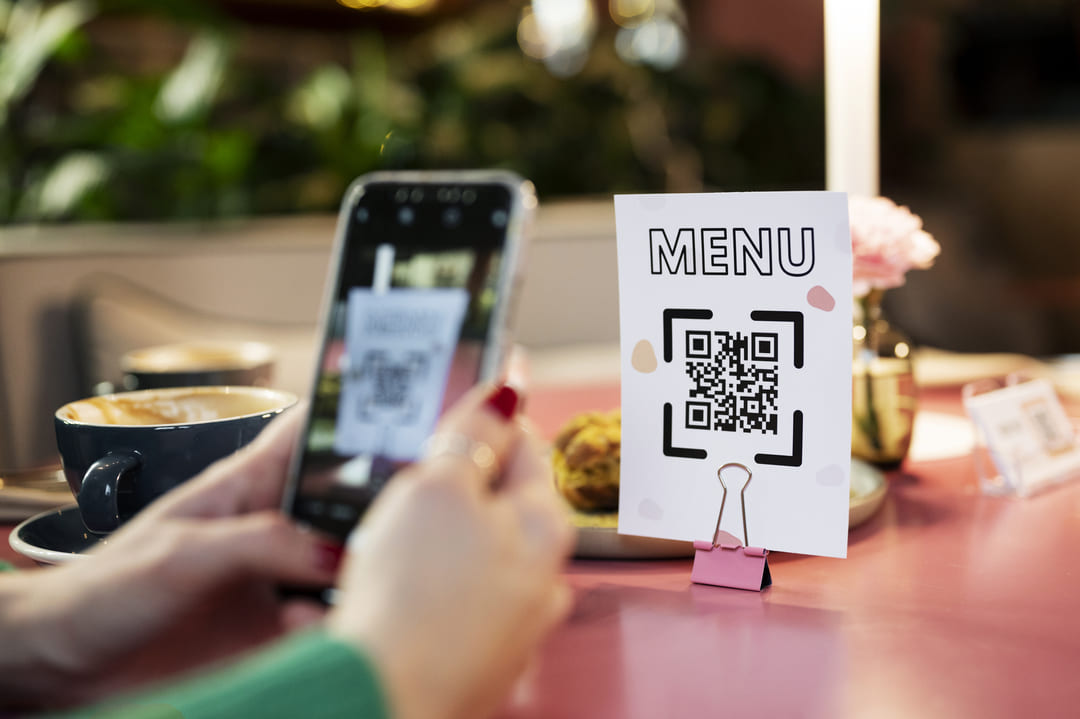
Description: Menus accessible via QR codes are extremely popular due to their simplicity and efficiency. Restaurants can generate QR codes that, when scanned by customers with their mobile devices, take them directly to a digital version of the menu.
Advantages:
- Quick and easy access: Customers simply scan the code with their phone's camera to access the menu.
- Low implementation cost: Generating and distributing QR codes is economical and straightforward.
- Flexibility: Menus can be hosted on websites, digital menu platforms, or even on social media.
Disadvantages:
- Connectivity dependency: Customers need an internet connection to access the digital menu.
- Variety in experience quality: The user experience may vary depending on the platform used to host the menu.
Comparison of digital menu types
| Menu Type | Interactivity | Implementation Cost | Ease of Update | Accessibility |
|---|---|---|---|---|
| PDFs linked on the website | Low | Low | Low | High |
| Interactive menus in mobile applications | High | High | High | Medium |
| Menus accessible via QR codes | Medium | Low | High | High |
Benefits of digital menus
For restaurants
Operational efficiency
Quick and easy update of menu items: Digital menus allow restaurants to make changes in real time without the need to print new versions. This is particularly useful for adjusting prices, adding new dishes or modifying ingredients based on availability. By eliminating the printing and distribution process, restaurants can respond quickly to market needs and keep their menu always up to date.
- Benefit: Significant reduction in waiting times and errors associated with outdated menus.
- Example: A restaurant can change the price of a dish or add a new offer in a matter of minutes, ensuring that customers always see the most accurate information.
Cost reduction
Less need to print physical menus: Digitizing the menu eliminates the need to print and reprint menus every time changes are made. This not only reduces printing and paper costs, but also design and distribution costs.
- Benefit: Savings in operational costs and reduction of paper waste, contributing to more sustainable practices.
- Example: A restaurant that changes its menu seasonally can save thousands of dollars a year by not having to reprint its physical menus.
Marketing improvement
Greater online visibility and better promotional opportunities: Digital menus can be optimized for search engines (SEO), which increases the restaurant's online visibility. In addition, these menus can be easily shared on social media, websites and review platforms, which expands the reach of promotion.
- Benefit: Increase in customer traffic and potential to attract new customers through SEO optimization and social media promotion.
- Example: A well-optimized digital menu can appear in Google search results when customers search for nearby dining options, increasing reservations and visits to the restaurant.
For customers
Convenience
Easy and quick access from any device: Customers can access digital menus from their smartphones, tablets or computers, without the need to handle physical menus. This is especially convenient in the post-pandemic era, where minimizing physical contact is crucial.
- Benefit: Improved user experience and greater customer satisfaction.
- Example: A customer can review the menu from their phone while waiting to be served, which speeds up the ordering process.
Detailed information
Greater transparency about ingredients, prices and special offers: Digital menus allow detailed information about each dish to be included, such as ingredients, nutritional values, allergens and prices. This helps customers make informed decisions and ensures that their dietary needs and preferences are met.
- Benefit: Improves customer trust and satisfaction by providing complete and transparent information.
- Example: A customer with food allergies can review the digital menu to ensure that the dishes are safe to eat, improving their experience at the restaurant.
Interactivity
Possibility of placing orders and paying directly from the digital menu: Interactive digital menus allow customers not only to view the menu, but also to place orders and make payments directly from their devices. This not only speeds up the ordering process, but also reduces the workload of restaurant staff.
- Benefit: Greater efficiency in service and a smoother experience for the customer.
- Example: A customer can customize their order and pay without waiting for staff to take their order, which reduces waiting times and improves the operational efficiency of the restaurant.
Comparative table of benefits
| Benefit | Description | Example |
|---|---|---|
| Operational efficiency | Quick and easy update of menu items | Change prices or add new dishes in minutes |
| Cost reduction | Less need to print physical menus | Savings in printing and design costs |
| Marketing improvement | Greater online visibility and better promotional opportunities | SEO optimization and social media promotion |
| Convenience | Easy and quick access from any device | Review the menu from a smartphone while waiting |
| Detailed information | Greater transparency about ingredients, prices and special offers | Information about allergens and nutritional values |
| Interactivity | Possibility of placing orders and paying directly from the digital menu | Place orders and make payments without waiting for staff |
Tools to create and manage digital menus
Marea Alcalina
Features:
- Digital menu creation: Allows restaurants to design attractive and easy-to-navigate digital menus that can be updated in real time.
- Integration with social media: Digital menus and catalogues can be integrated with the restaurant's social media profiles, facilitating promotion and content sharing.
- Performance analysis and tracking: Provides analytics tools that allow measuring the performance of digital menus, which helps restaurants make adjustments based on real data.
Benefits:
- SEO optimization: Marea Alcalina's digital menus are optimized for search engines, which helps improve the restaurant's online visibility and attract more customers.
- Ease of use: The platform is intuitive and easy to use, allowing restaurants to create and manage their menus without the need for advanced technical knowledge.
- Customization: Offers customization options that allow menus to be adapted to the restaurant's brand identity, including colours, fonts and layouts.
| Feature | Description |
|---|---|
| Digital menu creation | Design and update of attractive digital menus |
| Integration with social media | Facilitates promotion and content sharing on social media |
| Performance analysis and tracking | Analytics tools to measure and optimize digital menu performance |
| Benefit | Description |
|---|---|
| SEO optimization | Improves online visibility and attracts more customers |
| Ease of use | Intuitive platform that does not require advanced technical knowledge |
| Customization | Adaptation of menus to the restaurant's brand identity |
Tu Menu Digital
Features:
- QR code generation: Allows creating QR codes that customers can scan to access the digital menu, facilitating a contactless user experience.
- Cloud ordering system: Integrates a cloud ordering system that allows customers to place orders directly from their mobile devices.
- Multi-language support: Offers support for multiple languages, which is ideal for restaurants serving a diverse clientele.
Benefits:
- Unlimited scans: Customers can scan QR codes as many times as necessary without restrictions.
- Efficient order management via WhatsApp: Allows managing orders via WhatsApp, improving operational efficiency and communication with customers.
| Feature | Description |
|---|---|
| QR code generation | Creation of QR codes to access the digital menu |
| Cloud ordering system | Allows placing orders directly from mobile devices |
| Multi-language support | Support for multiple languages |
| Benefit | Description |
|---|---|
| Unlimited scans | No restrictions on the number of QR code scans |
| Efficient order management via WhatsApp | Improves operational efficiency and communication with customers via WhatsApp |
Wondershare PDFelement
Features:
- Advanced PDF editing: Allows creating and editing menus in PDF format with advanced editing tools.
- Detailed menu customization: Offers detailed customization options to adapt menus to the restaurant's identity.
- Professional templates: Provides a wide variety of professional templates that facilitate the creation of attractive menus.
Benefits:
- Creation of attractive menus: Facilitates the creation of visually attractive menus that can capture customers' attention.
- Adaptability to the restaurant's identity: Allows menus to reflect the restaurant's unique image and style, improving brand consistency.
| Feature | Description |
|---|---|
| Advanced PDF editing | Creation and editing of menus in PDF format with advanced tools |
| Detailed menu customization | Detailed customization options to adapt menus |
| Professional templates | Wide variety of professional templates for creating attractive menus |
| Benefit | Description |
|---|---|
| Creation of attractive menus | Visually attractive menus that capture customers' attention |
| Adaptability to the restaurant's identity | Menus that reflect the restaurant's image and style |
How to implement digital menus in your restaurant
Implementing digital menus in your restaurant may seem like a daunting task at first, but by following a step-by-step approach, you can ease the process and ensure that your restaurant is ready to offer a modern and efficient experience to your customers. Below, a detailed process for implementing digital menus is described, from registration to continuous optimization.
Step by step for implementation
1. Registration and initial setup
Description: The first step to implementing digital menus is to register on a platform that offers this functionality. There are several options on the market, such as Tu Menú Digital, Marea Alcalina, and Wondershare PDFelement.
Actions to follow:
- Choose a platform: Research and select the platform that best suits your needs and budget.
- Registration: Complete the registration process on the chosen platform.
- Menu upload: Upload your current menu in digital format (PDF, images, etc.) to the platform.
Example:
- Go to the Tu Menú Digital registration page.
- Complete the registration form with your restaurant's information.
- Upload your current menu to the platform following the instructions provided.
2. Menu customization
Description: Customizing your digital menu is crucial to maintaining consistency with your brand identity. Customization includes adjusting colours, backgrounds, fonts and menu layout to reflect your restaurant's image.
Actions to follow:
- Colour and background adjustment: Select colours and backgrounds that match your brand identity.
- Font selection: Choose fonts that are legible and align with your restaurant's style.
- Menu layout: Organize dishes and sections in a logical and attractive way.
Example:
- Access the customization panel in Marea Alcalina.
- Select your restaurant's corporate colours for the background and texts.
- Choose a legible font and adjust the size and style of the texts according to your preferences.
3. Generation and use of QR codes
Description: QR codes are an efficient and contactless way to allow customers to access your digital menu. These codes can be placed on tables, counters, or even at the restaurant entrance.
Actions to follow:
- QR code generation: Use your platform's QR code generation tool to create the codes.
- Printing and distribution: Print the QR codes and place them in strategic locations within your restaurant.
Example:
- In Tu Menu Digital, access the QR code generation section.
- Generate a QR code for your digital menu.
- Print the QR codes and place them on each table and at the restaurant entrance.
4. Digital menu promotion
Description: Promoting your digital menu is essential to ensure that your customers know they can access it. Use social media, email and other marketing channels to publicize your new digital menu.
Actions to follow:
- Social media: Post about your new digital menu on all your social media platforms.
- Email: Send a newsletter to your customer list announcing the digital menu.
- In-restaurant advertising: Place signage in the restaurant informing customers about the availability of the digital menu.
Example:
- Create a post on Facebook and Instagram showing how customers can scan the QR code to see the digital menu.
- Send an email to all your subscribers announcing the new digital menu and its benefits.
5. Monitoring and adjustments
Description: Once your digital menu is up and running, it is important to monitor its performance and make adjustments as necessary. Use the analytics tools provided by the platform to evaluate how customers are interacting with the menu and what improvements can be made.
Actions to follow:
- Analytics review: Regularly review analytics reports to see which dishes are most popular and how customers are using the menu.
- Continuous adjustments: Make adjustments to the menu based on the collected data, such as reorganizing dishes, adjusting prices or adding new offers.
Example:
- Access the analytics section in Marea Alcalina.
- Review the menu performance reports to identify trends and areas for improvement.
- Make the necessary adjustments, such as moving the most popular dishes to the top of the menu or highlighting special offers.
Tips for optimizing digital menus for SEO
Optimizing digital menus for SEO is a crucial strategy for improving a restaurant's online visibility and attracting more potential customers. Below, some detailed tips are presented to achieve effective optimization.
Keywords and descriptions
Include relevant keywords in the menu titles and descriptions
Description: Keywords are terms that potential customers will likely use to search for restaurants and menus online. Including these keywords in the titles and descriptions of the digital menu helps to improve ranking in search engines.
Actions to follow:
- Keyword research: Use tools such as Google Keyword Planner, Ahrefs or SEMrush to identify relevant keywords related to your dishes and services.
- Title optimization: Ensure that the titles of dishes and menu sections include relevant keywords. For example, instead of simply "Pizza Margherita", use "Authentic Pizza Margherita".
- Detailed descriptions: Write attractive and detailed descriptions that include keywords. Describe the ingredients, the cooking method and any unique characteristics of the dish.
Optimization example:
- Title: Authentic Pizza Margherita
- Description: Our Authentic Pizza Margherita is made with fresh ingredients, including San Marzano tomatoes, buffalo mozzarella and fresh basil, all baked in our traditional wood-fired oven.
Use attractive meta descriptions to improve CTR in search results
Description: Meta descriptions are snippets of text that appear below the page title in search results. A well-written meta description can increase the click-through rate (CTR).
Actions to follow:
- Write clear and concise meta descriptions: Limit meta descriptions to 150-160 characters and ensure they are descriptive and attractive.
- Include a call to action (CTA): Encourage users to click the link with phrases such as "Discover our menu", "Book now" or "Visit us today".
- Incorporate keywords: Include relevant keywords at the beginning of the meta description to capture the user's attention.
Meta description example:
- Meta description: "Discover our authentic Italian menu with dishes such as Pizza Margherita and Risotto al Funghi. Book now and enjoy a unique culinary experience!"
Integration with social media and reviews
Connect your digital menu to your social media profiles
Description: Integrating the digital menu with the restaurant's social media profiles can increase visibility and attract more traffic.
Actions to follow:
- Add social media links to the digital menu: Include icons and direct links to your Facebook, Instagram, Twitter, etc. profiles.
- Post menu updates on social media: Share photos and descriptions of new dishes or special promotions on your social media.
- Use relevant hashtags: Use popular and relevant hashtags to increase the visibility of your social media posts.
Integration example:
- Post a photo of a new dish on Instagram with an attractive description and a link to the digital menu in the biography: "New on our menu! 🍕 Authentic Pizza Margherita with buffalo mozzarella. See more on our digital menu: [link] #PizzaMargherita #ItalianCuisine #RestaurantName"
Encourage customer reviews and feedback to improve visibility and online reputation
Description: Positive reviews can significantly improve a restaurant's online reputation and its ranking in search engines.
Actions to follow:
- Request reviews from customers: After a visit, send an email or text message asking customers to leave a review on Google, Yelp, TripAdvisor, etc.
- Respond to reviews: Interact with customers by responding to their reviews, thanking positive comments and constructively addressing negative ones.
- Show reviews on the digital menu: Include testimonials from satisfied customers in the digital menu to increase the trust of new customers.
Review request example:
- Send a follow-up email: "Thank you for visiting us at [Restaurant Name]. We would love to hear your opinion. Please leave a review on Google to help us improve and help other customers discover us: [link]"
Request Information and Take Your Restaurant to the Next Level
Ready to increase your sales and optimize the management of your restaurant? Discover how our solutions at Cover can transform your business. Fill in the form and receive personalized advice to implement reservation management, payment tools and more.